MoodLab
사진 한 장에, 머물고 싶은 빛을.
MoodLab은 서울의 장소와 시간에서 영감을 받은 사진 편집 앱입니다. 뚝섬의 여름빛, 비 오는 망원, 연남의 창가처럼 서로 다른 표정을 가진 30가지 무드로 일상의 사진을 다듬어 보세요.
무드 엽서에서 시작하기
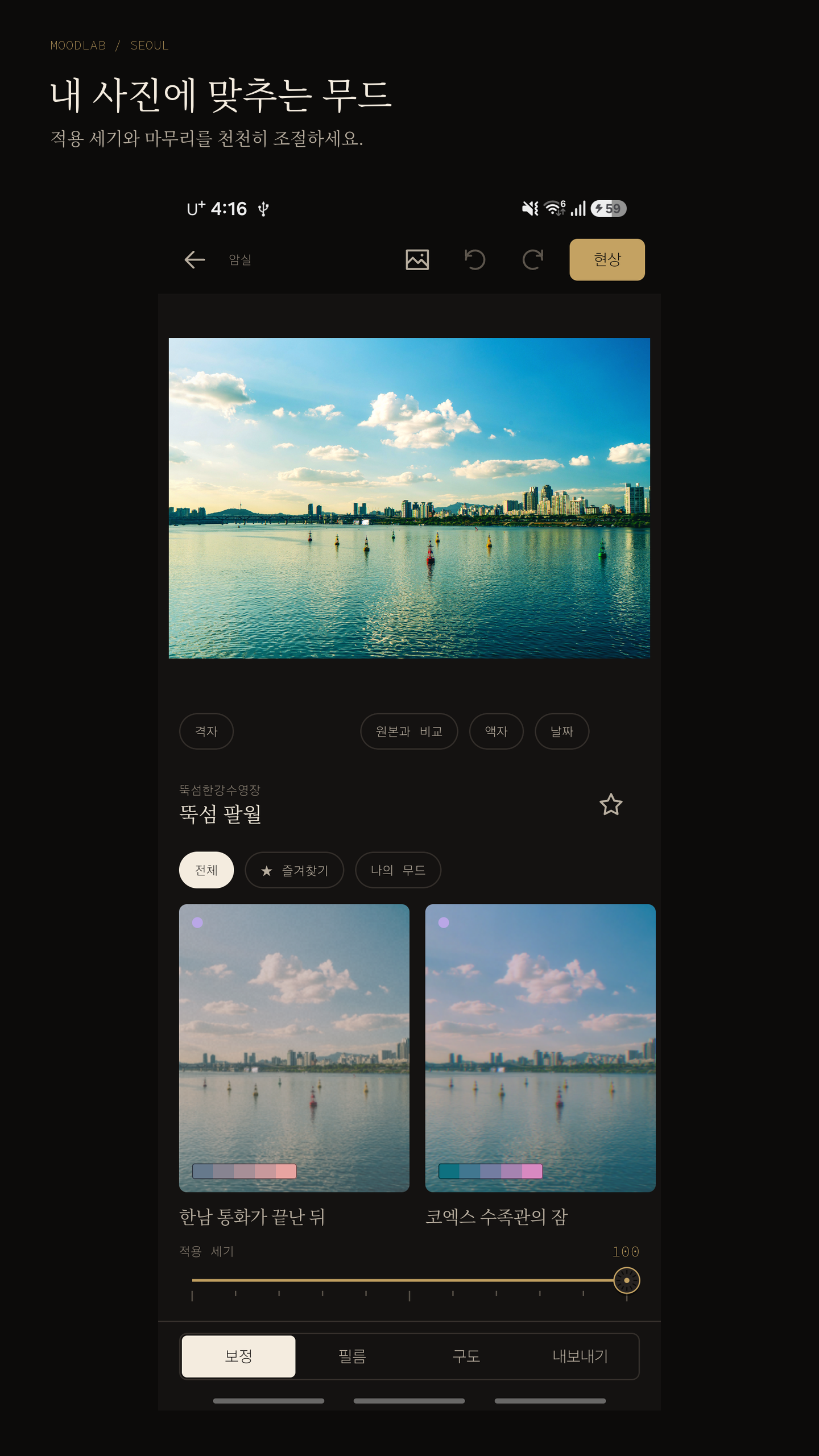
각 무드의 사진과 소개를 살펴보고, 적용 전후를 비교한 뒤 내 사진에 어울리는 분위기를 골라보세요. 무드의 적용 세기를 조절하고 나만의 색으로 마무리할 수 있습니다. 무드 이름은 서울에서 영감을 받았으며, 견본에는 다양한 장소에서 촬영한 사진도 포함됩니다.
빛과 색을 차분하게
노출, 대비, 하이라이트, 그림자, 색온도, 틴트, 생동감과 채도를 조절하세요. 그림자와 밝은 영역에 각각 색을 더하는 토닝으로 사진의 분위기를 세밀하게 바꿀 수 있습니다.
필름의 흔적을 더하기
그레인, 페이드, 비네트, 블룸, 할레이션, 빛샘, 소프트니스와 색 어긋남을 조절해 보세요. 액자와 날짜 스탬프를 더하거나 사진의 비율, 회전, 반전, 기울기를 다듬을 수 있습니다.
촬영부터 저장까지
카메라에서 무드를 미리 보며 촬영하고, 편집 화면에서 이어서 다듬으세요. 완성한 사진은 JPEG, PNG 또는 WebP로 새 파일에 저장합니다. 원본 화질 옵션과 공유하기 편한 경량 옵션을 제공하며, 큰 사진은 기기 메모리에 맞춰 저장 크기가 줄어들 수 있습니다.
다시 꺼내 보는 나의 취향
마음에 드는 무드를 선호 무드에 모으고, 직접 조절한 설정은 나의 무드로 저장하세요. 암실 기록에서 이전 편집을 다시 이어갈 수 있습니다. 기록을 다시 열려면 원본 사진을 계속 이용할 수 있어야 합니다.
사진 편집은 기기 안에서
계정 없이 시작할 수 있습니다. 사진 편집은 기기에서 처리하며 자체 서버에 사진을 업로드하지 않습니다. 원본을 덮어쓰지 않고 결과를 새 파일로 저장합니다. 앱 화면 하단과 사진 현상 진행 화면 상단에는 Google AdMob 배너 광고가 표시됩니다. 광고·동의 서비스는 인터넷 연결이 필요합니다. 개인정보처리방침은 홈의 앱 정보에서 확인하며, 동의 관리 서비스가 요구할 때 같은 메뉴에 광고 개인정보 설정이 표시됩니다. 공유 앱이나 Android의 백업·사진 동기화는 해당 서비스의 설정에 따릅니다.
카메라 권한은 직접 촬영할 때 사용합니다. 기존 사진은 Android 시스템 사진 선택기로 고릅니다.
MoodLab is a photo editor inspired by the places and hours of Seoul. Start with one of 30 moods, from summer light by the Han River to a rainy street in Mangwon or a quiet window in Yeonnam, then make it your own.
Start with a mood postcard
Explore sample photographs and the story behind each mood. Compare the original and edited versions, choose a look for your photo and adjust its strength. The mood names are inspired by Seoul; sample photographs also include other places.
Shape light and colour
Adjust exposure, contrast, highlights, shadows, temperature, tint, vibrance and saturation. Add separate colours to shadows and highlights with the toning controls.
Leave a trace of film
Fine-tune grain, fade, vignette, bloom, halation, light leaks, softness and colour fringe. Add a frame or date stamp, and refine the aspect ratio, rotation, flip and tilt.
From camera to finished photo
Preview moods in the camera, take a photo and continue editing. Save a new copy as JPEG, PNG or WebP, with Original quality and Light size options. Large photos may be reduced to fit your device's available memory.
Keep your own looks
Star favourite moods, save your adjustments as My moods and return to past edits in the Darkroom log. Reopening a past edit requires continued access to its source photo.
Edit on your device
No account is required. Photo editing happens on your device, and MoodLab does not upload your photos to its own servers for editing. Your original is not overwritten; finished photos are saved as new files. Google AdMob provides bottom banner ads across app screens and an additional top banner during photo development. Advertising and consent services require an internet connection. Find the privacy policy under App info on the home screen; ad privacy choices appear there when required by the consent service. Sharing apps, Android backup and photo synchronisation follow the settings and policies of those services.
Camera permission is used when you choose to take a photo. Existing photos are selected through the Android system photo picker.